Platform
OverviewHow It WorksONU ScoreAI EngineHardware & Integrations
ONU BraceletBracelet SpecsIntegrationsPlatform
OverviewHow It WorksONU ScoreAI EngineHardware & Integrations
ONU BraceletBracelet SpecsIntegrations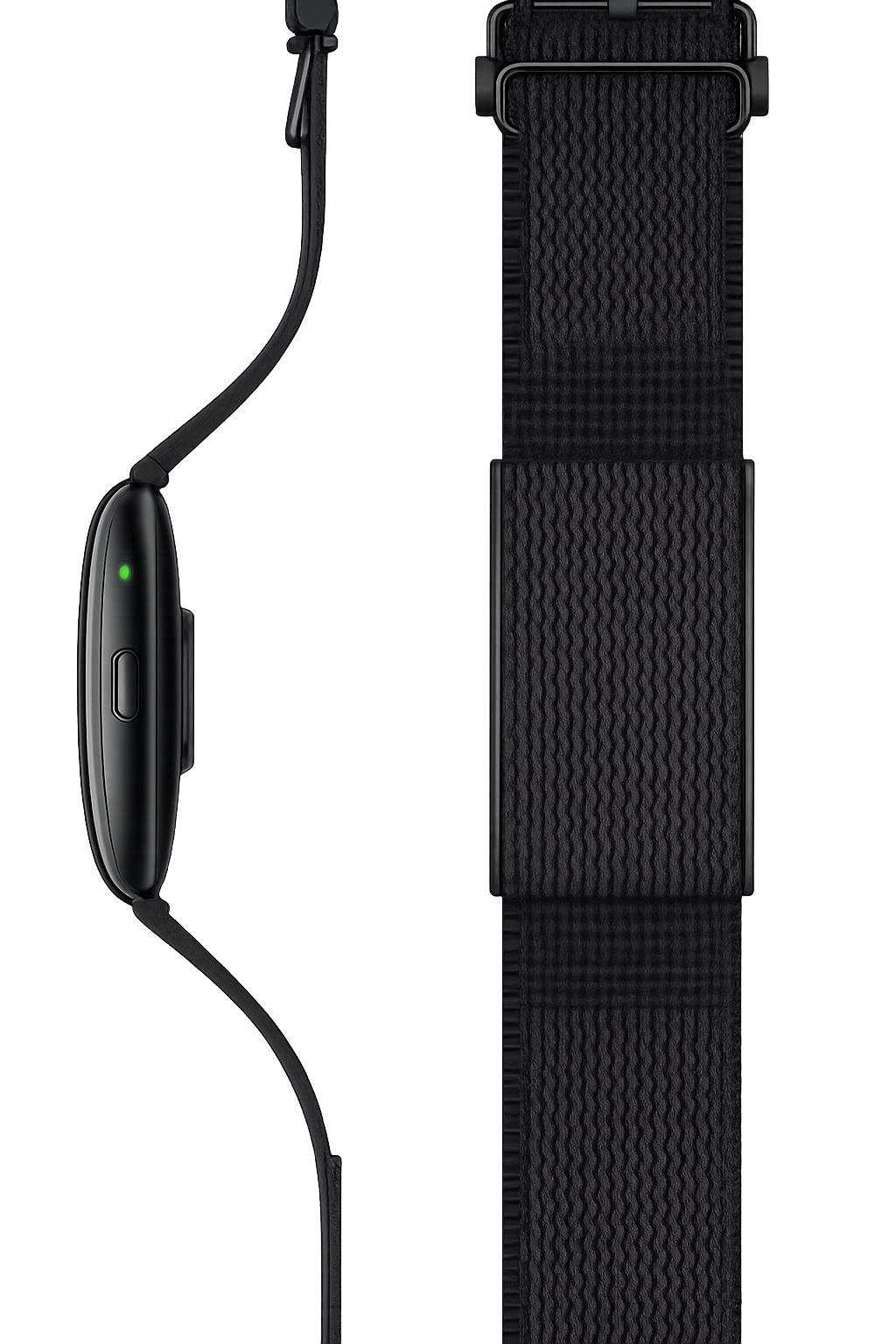
This page breaks down every technical detail of the ONU Bracelet (Series 3), ONU's full-experience hardware upgrade (an extra $99 on top of an ONU subscription) — for anyone comparing wearables feature-by-feature before buying.
At a glance
A quick reference before ordering
Up to 30 days in battery-saving mode
Full charge from empty
CE certified
Sensors: heart rate, sleep, blood oxygen, stress index, blood pressure insights, cardio fitness notifications.
Design
Design
Form factor
Screen-free band with a flexible nylon strap.
Weight and profile
Designed to be worn continuously, including overnight, without the bulk of a screen-based smartwatch.
Fit
Flexible strap designed for continuous, comfortable all-day and all-night wear.
Battery and charging
Built for weeks, not nights
Up to 22 days of battery life with normal use after a full charge, up to 30 days in battery-saving mode, and approximately 45 minutes until fully charged from empty. In practice, this means most users charge the Bracelet roughly twice a month rather than nightly — a deliberate design choice, since a device that's constantly on the charger can't collect overnight sleep data.
Durability and certification
Durability and certification
1 ATM water resistance — rated for everyday water exposure such as handwashing, sweat, and rain (not intended for swimming or submersion). CE certified.
Sensors and tracked signals
Sensors and tracked signals
Heart rate
Continuous monitoring, with notifications for readings outside your typical high or low range.
Sleep index
Feeds directly into your ONU Score's sleep component.
Blood oxygen
Ongoing background tracking.
Stress index
Tracks stress load through the day based on heart data.
Cardio fitness
Notifications if data suggests unusually low cardio fitness.
Blood pressure insights
Algorithm-based wellness estimates, not direct medical measurements.
Sedentary reminders
Prompts to move during long stretches of inactivity.
Syncing
How data leaves the device
Data collected by the ONU Bracelet is stored on the device itself between syncs — so if you're away from your phone for a stretch, your data isn't lost, it simply uploads to the ONU app the next time the two are within range of each other. Once synced, everything flows into your ONU Score and the broader pattern analysis engine described on the product overview page.
In the box
What's in the box
The ONU Bracelet ships with the band itself and its charging cable; no additional accessories are required to begin tracking once paired with the ONU app.
Compatibility
Compatibility
The ONU Bracelet pairs directly with the ONU app (iOS; Android in waitlist). It is a standalone tracking device and does not require Apple Health, Whoop, or Garmin to function — though if you already use one of those platforms, you can run the Bracelet alongside them, and ONU will reconcile overlapping data. See how ONU handles multiple connected data sources.
Important
Important safety and use information
The ONU Bracelet is designed for general wellness and educational purposes only. It is not a medical device and does not diagnose, treat, cure, or prevent any disease. It is not intended for users under 18. Heart rhythm and blood pressure–related notifications are wellness-based estimates, not medical-grade diagnostics, and should not be used to adjust medication or in place of professional medical advice. Anyone with a known heart rhythm disorder should consult a healthcare provider before relying on wearable notifications. Always speak with a qualified healthcare professional about any health concern.
Colors and options
Colors and options
The ONU Bracelet is available in a small range of band colors at launch, shown at checkout; additional color and band-material options may be introduced over time based on demand.
Materials and fit
Materials and fit
The band uses a flexible nylon strap designed to sit comfortably against the skin for continuous wear, including overnight. The sensor housing is compact and screen-free by design, reducing bulk compared to a traditional smartwatch case while keeping the sensor array positioned consistently against the wrist for reliable readings.
Accuracy
Sensor accuracy and placement
Like all wrist-worn optical heart rate sensors, accuracy depends partly on fit — a band worn snugly (but comfortably) against the skin, positioned slightly above the wrist bone, generally produces more reliable heart rate and blood oxygen readings than a loosely worn band. If you notice inconsistent readings, checking band tightness and position is the first troubleshooting step, the same as with any wrist-worn optical sensor on the market.
Firmware
Firmware updates
The ONU Bracelet receives periodic firmware updates through the ONU app to improve sensor accuracy, add features, and address any issues identified after launch. Updates are delivered automatically when the Bracelet is within range of the paired phone and the app is open.
Comparison
Comparing ONU Bracelet to a smartwatch
Unlike a general-purpose smartwatch, the ONU Bracelet doesn't run apps, display notifications, or support contactless payment — it's purpose-built around one job, continuous passive health sensing, which is also why it can go weeks between charges rather than requiring nightly charging like most smartwatches. If you want notifications, apps, and health tracking in a single device, an Apple Watch or Garmin device connected to ONU through ONU's integrations may be a better fit; if you specifically want dedicated, unobtrusive, long-battery-life health tracking, the Bracelet is built for exactly that.
FAQ
Frequently asked questions
Care
Caring for your ONU Bracelet
A few simple habits extend the life and accuracy of the device: rinse the band with fresh water after exposure to sweat or salt water (even though it's not designed for full submersion), avoid extended exposure to extreme heat or direct sunlight when not worn, and periodically clean the sensor contacts on the underside of the device with a soft, dry cloth to maintain accurate skin contact for heart rate and blood oxygen readings. Avoid harsh chemicals, solvents, or abrasive cleaners on the band or sensor housing.
Setup
Setting up your ONU Bracelet for the first time
Pairing is done through the ONU app: open Settings > Connected Devices > ONU Bracelet, follow the on-screen Bluetooth pairing steps, and allow a few minutes for the initial full sync of any data already recorded on the device before pairing. After the first setup, the Bracelet syncs automatically whenever it's within Bluetooth range of your paired phone with the ONU app installed.
Replacing or resetting your ONU Bracelet
If you need to reset the device (for troubleshooting, or before transferring it to someone else), a factory reset option is available through the device settings in the ONU app; resetting clears locally stored device data but does not affect your ONU account history, which remains stored in your account.
What's next
What's next for the ONU Bracelet
As ONU's AI health engine evolves, new sensor capabilities and features are periodically added to the Bracelet lineup through both hardware iterations (like Series 3's improvements over earlier versions) and software updates to existing devices. Check the ONU Blog for announcements about new Bracelet features and future hardware releases.
Ready to order
Ready to order
The ONU Bracelet is available to order through the ONU shop, with current delivery estimates and regional pricing shown at checkout, including any current band-color or size-bundle options.
Back to the ONU Bracelet overview or see how the Bracelet fits alongside ONU Free and ONU Pro.
ACTION
Know it before it happens
ONU provides you with tools to build your healthy future; now it's your time to use them!